
Introduction
In an increasingly crowded market, your lead management isn't just a process— it's your competitive edge. For modern sales teams, a fragmented pipeline leads to missed opportunities, inaccurate forecasts, and unpredictable revenue. The challenge is clear: how can businesses gain a unified view of every opportunity to close deals with precision?
The solution lies in a centralised system that turns pipeline chaos into clarity. Odoo CRM — part of the broader Odoo ERP ecosystem, provides an intuitive, flexible, and scalable platform for lead and pipeline management. Whether you’re a small business or a growing enterprise, Odoo’s CRM module gives you the tools to take control of your sales processes, improve collaboration, and generate revenue more reliably.
This article explores how you can manage leads and pipelines with Odoo, including practical features, workflows, and best practices.
1. The Sales Funnel: Understanding Leads vs. Opportunities
Before diving into Odoo specifics, it’s important to clarify key concepts:
Leads:
Unqualified contacts that may become prospects. They often come from inbound channels (website forms, events, campaigns, social media, referrals, etc.).
Opportunities:
Leads that have been qualified as potential customers with a real chance to close. These are further nurtured through the sales pipeline.
Odoo supports this flow seamlessly by helping your team capture leads, qualify them, convert them to opportunities, and manage them through a customisable pipeline.
2. Centralised Lead Capture: Never Lose a Prospect
One of Odoo’s strengths is its ability to consolidate lead capture from multiple sources:
A. Website Forms
- Easily embed Odoo’s contact or opportunity forms on your website.
- Form submissions automatically become leads in the CRM.
- No manual import or data entry — just structured, actionable data.
B. Email Integration
- Connect email inboxes directly to Odoo.
- Incoming customer emails can be converted to leads automatically.
- Conversations stay in context within the CRM.
C. Manual Input & Imports
- Add leads manually through the CRM interface.
- Bulk import leads from spreadsheets or previous systems.
Business Value
Centralising lead capture eliminates dropped prospects and ensures all inbound inquiries become part of your sales process.
3. Qualifying Leads: From Potential to Pipeline
Once leads are in Odoo, the next step is qualification.
Lead Scoring
Odoo allows you to assign scores based on:
- Source quality
- Engagement level
- Industry fit
- Product interest
Some implementations can even use AI-assisted scoring (in Odoo 19) to highlight high-value leads automatically.
Conversion to Opportunity
Once a Lead meets your qualification criteria, you can convert it to an Opportunity with:
- Assigned sales team
- Expected revenue
- Timeline or closing date
- Custom fields that matter to your business
This creates a smooth transition from raw inquiry to a managed sales opportunity.

4. Managing Your Sales Pipeline: Kanban and Stages
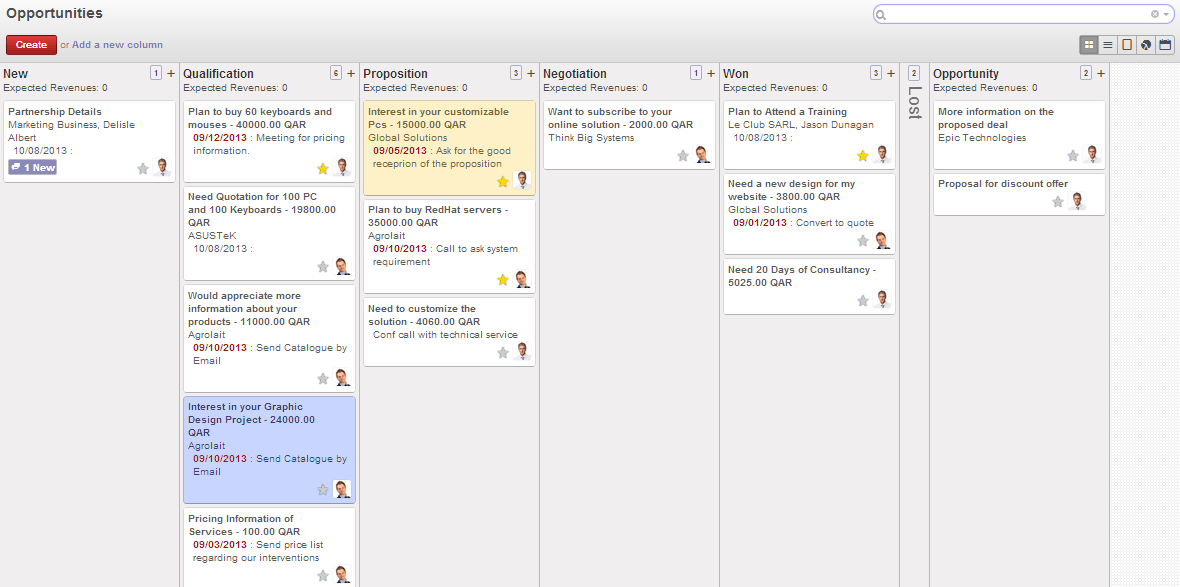
The heart of sales execution in Odoo CRM is the Pipeline View.
Visual Pipeline (Kanban)
- Drag-and-drop deals between stages.
- Customise stages (Lead, Contacted, Proposal, Negotiation, Won, Lost, etc.).
- See progress at a glance.
Stage Probability & Forecasting
Each stage can be assigned a probability (e.g., 10%, 50%, 90%) which helps you generate more accurate sales forecasts automatically.
Team Collaboration
- Assign opportunities to sales reps.
- Add followers to get notifications.
- Log calls, meetings, and emails directly within the opportunity.
Business Value
A visual pipeline empowers sales leaders to track deal flow, identify bottlenecks, and coach teams for better conversions.
5. Communication and Activity Tracking
Effective pipeline management isn’t just about stages — it’s about communication.
Integrated Email and Activity Tools
- Send and receive emails from within Odoo.
- Log all touchpoints automatically.
- Schedule follow-ups, calls, meetings, and reminders.
Activity Planning
Odoo’s activity feature ensures that nothing falls through the cracks:
- Set planned activities for calls, demos, follow-ups.
- Link activities to opportunities, leads, or customers.
- See overdue tasks and priority actions in team dashboards.
Business Value
Teams stay organised, accountable, and aligned, increasing responsiveness and closing rates.
6. Sales Reporting and Insights
Odoo CRM isn’t just transactional, it’s analytical.
Key Dashboards and Reports
- Pipeline by salesperson
- Forecast vs. actual revenue
- Lead source performance
- Conversion rates
- Lost reason analysis
These insights help sales leaders understand:
- What is driving revenue
- Where deals are stalling
- Which channels deliver quality leads
AI-enhanced analytics (in Odoo 19) can bring even more context by highlighting anomalies, predicting trends, and suggesting next steps.
7. Automation and Smart Follow-Ups
Automation is a game-changer in modern sales processes — and Odoo delivers:
Rule-Based Actions
You can automate common workflows like:
- Auto-assign new leads to specific reps
- Send welcome or follow-up emails based on events
- Trigger alerts when opportunities are idle
AI Suggestions
In advanced versions (like Odoo 19):
- AI can suggest best actions, next steps, or prioritised follow-ups
- Smart recommendations help reps focus on high-impact activities
Business Value
Automation reduces manual busy work and ensures consistent follow-through on leads and opportunities.
8. Integrating CRM With Other Business Functions
One of the biggest advantages of Odoo’s CRM is that it’s fully integrated with the larger ERP ecosystem, unlike stand-alone CRMs.
Accounting and Invoicing
Convert won deals directly into sales orders and invoices — no data re-entry.
Inventory and Fulfillment
Track product availability before promising on delivery timelines.
Marketing Automation
Send targeted campaigns and measure their impact on lead generation.
Customer Support (Helpdesk)
Convert opportunities into support cases post-sale for better customer experience tracking.
Business Value
Integration eliminates silos and ensures every team sees the same customer data, improving operational efficiency and customer satisfaction.
9. Best Practices for Managing Leads and Pipelines With Odoo
A. Standardise Your Stages and Definitions
Ensure all team members understand what qualifies a lead and what defines each stage in the pipeline.
B. Clean Your Data Regularly
Remove duplicates, invalid contacts, and unresponsive leads to keep your CRM healthy.
C. Enable Email & Calendar Sync
Connect your team’s email and calendar for seamless interaction logging and activity planning.
D. Leverage Dashboards for Daily Standups
Sales managers can use pipeline dashboards in team huddles to quickly review progress and risks.
E. Use Automation and AI Wisely
Identify repetitive tasks and set up automations so your reps focus on high-value activities.
Conclusion
Managing leads and pipelines effectively requires more than spreadsheets and scattered notes — it requires process discipline, clear visibility, and smart automation. Odoo CRM provides all of these in a unified platform that not only tracks opportunities but also connects sales with marketing, finance, and operations.
For businesses aiming to grow with confidence, Odoo’s integrated lead and pipeline management capabilities, coupled with automation, AI-assisted insights, and real-time reporting, provide a strategic edge. Whether you’re capturing new prospects or closing major accounts, Odoo helps your team stay organised, focused, and predictable.
Is your sales process organized for predictable growth? See how Odoo CRM’s automation and insights can help your team close deals with confidence. Contact us today!