
Odoo 20 is officially here.
Released in September 2026 at the Odoo Experience, the latest version of Odoo marks a major shift in how businesses use an ERP—not just to record and manage transactions, but to automate processes, support employees with AI, and connect more of their day-to-day operations.
The release brings new functionality across the Odoo ecosystem, including AI agents, Accounting, CRM, Sales, Purchasing, Inventory, Manufacturing, Website, eCommerce, Point of Sale, Field Service, Planning, Payroll, and communication tools.
For businesses considering Odoo for the first time, the release raises an important question:
What does Odoo 20 actually mean for the way a business operates?
And for existing Odoo users, another question follows:
Which new features are worth adopting, and what should we consider before upgrading?
This guide explores the major Odoo 20 developments and how they could affect businesses.
What Is Odoo 20?
Odoo 20 is the latest major version of the Odoo business management platform.
Odoo brings together applications covering areas such as:
- CRM
- Sales
- Accounting
- Inventory
- Purchasing
- Manufacturing
- Human Resources
- Marketing
- eCommerce
- Point of Sale
- Project Management
- Field Service
- Helpdesk
- Website
- Documents
- Communication
- AI
The platform's integrated approach means information generated in one area can be used by other connected applications.
Odoo 20 builds on this foundation while putting considerably more emphasis on AI-assisted work and process automation.
Odoo describes the release as bringing a fresh interface, processes that can run themselves, and AI capabilities that can operate across business workflows.
1. AI Agents Can Now Run Business Processes
Perhaps the biggest change in Odoo 20 is the role of AI.
Previous generations of business software often treated AI as a tool for generating text, answering questions, or summarising information.
Odoo 20 goes further.
Its AI agents can be instructed in natural language to perform actions within Odoo workflows.
For example, an organisation could configure an AI-driven process to:
- Confirm a sales order when a matching email arrives.
- Assign incoming leads to the appropriate salesperson.
- Create a project when a contract is signed.
- Notify a team when inventory falls below a specified level.
Odoo says AI agents can automate processes simply by being told what to do in plain language, while explaining the intended action before executing it.
The Odoo 20 documentation also introduces AI Server Actions, where an AI decision-maker interprets context and selects predefined tools to execute actions. This creates a distinction between the AI deciding what should happen and the underlying tool enforcing the actual business logic.
What this means for businesses
This could reduce the amount of repetitive administrative work employees have to perform manually.
Instead of employees repeatedly monitoring records and initiating predictable actions, businesses can create workflows that respond automatically to events.
The potential impact is particularly relevant for organisations with:
- High transaction volumes.
- Repetitive administrative processes.
- Large sales pipelines.
- Frequent purchasing activities.
- Complex approval processes.
- Multiple departments sharing information.
But AI automation should still be implemented carefully.
Businesses need to define appropriate permissions, business rules, and review points. AI can make decisions within a workflow, but organisations still need controls around what an automated process is allowed to do.
2. Connect External AI Tools Through MCP
Odoo 20 also introduces an AI Model Context Protocol (MCP) server.
MCP is an open standard that allows AI applications to interact with external systems and access their data.
With Odoo's MCP functionality, an external AI agent can connect to an Odoo database and, depending on the configured permissions, read or modify information through exposed tools.
Why this matters
Businesses are increasingly using AI tools outside their ERP.
MCP creates a way for external AI workflows to interact with Odoo rather than operating completely separately.
For example, an organisation could connect an AI development or productivity workflow to its Odoo database and allow it to work with specific Odoo records.
This opens up possibilities for businesses that want to build AI-powered workflows around their ERP data without treating Odoo as an isolated system.
Security and permissions remain critical, however. Access should be deliberately configured so that external AI agents only have the capabilities they actually need.
3. CRM Gets More Powerful Lead Generation
Odoo 20 introduces new ways for businesses to generate and manage leads.
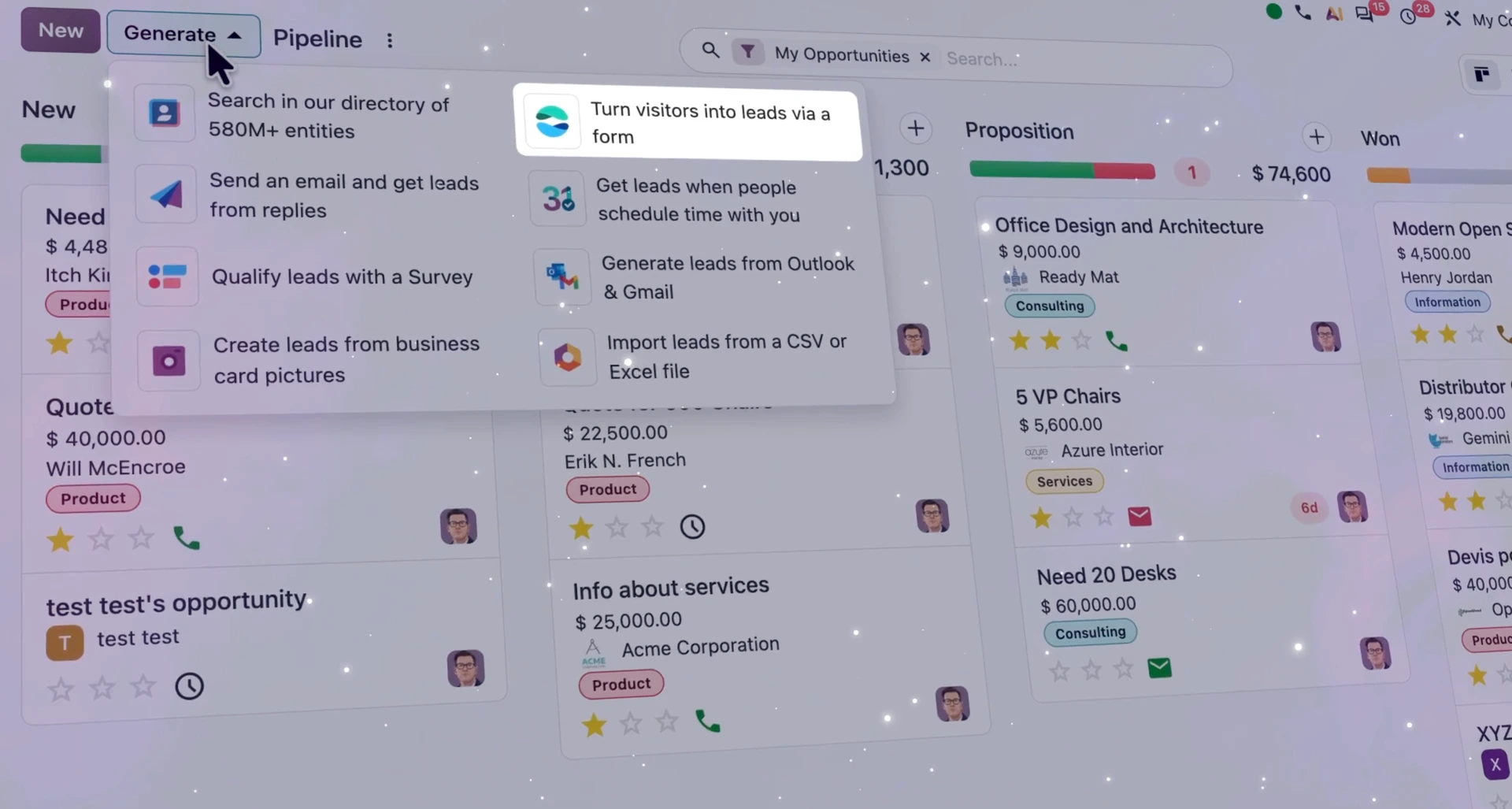
Odoo highlights access to a directory containing more than 580 million entities, allowing businesses to search for potential prospects based on factors such as industry and location.
Other lead-generation improvements include:
- Turning website visitors into prospects using IP detection.
- Importing contacts from Outlook or Gmail.
- Scanning business cards to create opportunities.
- Automatically routing leads into the appropriate sales pipeline.
- Managing multiple pipelines more efficiently.
What this means for businesses
For sales teams, CRM is not only about recording leads after they arrive.
The ability to identify potential prospects, capture contacts, and automatically route opportunities can reduce the amount of manual work involved in building and managing a pipeline.
For organisations with multiple sales teams or business units, automatic pipeline assignment can also help prevent leads from being lost between teams.
4. Sales Gets More Flexible
Odoo 20 introduces improvements designed to make quoting and sales workflows more flexible.
These include:
- Quotation section templates.
- Editable margins.
- Periodic pricing.
- Improvements to sales workflows.
These may sound like relatively small changes, but they can matter in organisations where quotations are complex or where sales teams need more control over how offers are structured.
What this means for businesses
Sales teams can potentially spend less time manually rebuilding quotations and have greater visibility into the commercial side of deals.
For companies selling services, packaged offerings or complex products, structured quotation templates can also make the sales process more consistent.
5. Smarter Purchasing and Inventory Management
Odoo 20 introduces several improvements across Purchasing and Inventory.
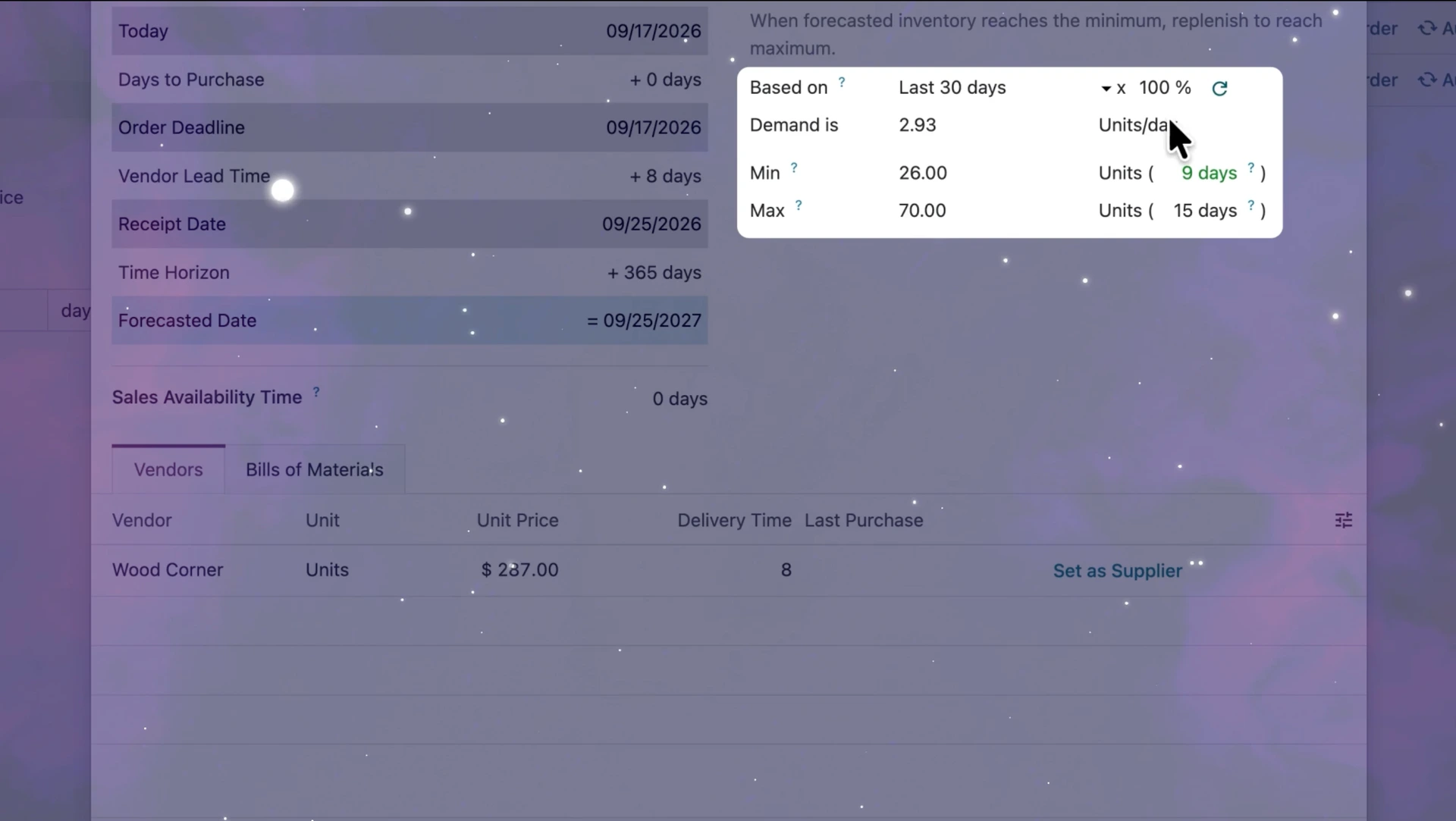
One notable change is the ability to calculate suggested minimum and maximum stock levels based on recent sales data.
Odoo describes a workflow where the system analyses the previous 30 days of sales, suggests appropriate stock levels, and can draft a purchase order.
Other purchasing and inventory improvements include:
- Vendor quality ratings.
- Better purchase-order-to-bill matching.
- Clearer identification of discrepancies.
- Improved shipment handling.
- New inventory-related reports.
- Improved stock management.
What this means for businesses
Inventory management is particularly important for retailers, distributors, and manufacturers.
Too much stock ties up working capital.
Too little stock can result in missed sales and production interruptions.
By using recent sales data to support replenishment decisions, Odoo can help businesses move towards more data-driven inventory planning.
However, automated replenishment should still reflect factors such as supplier lead times, seasonal demand, minimum order quantities, and business-specific requirements.
6. Manufacturing Becomes More Responsive
Manufacturing receives several important updates in Odoo 20.
One of the key improvements is continuous production.
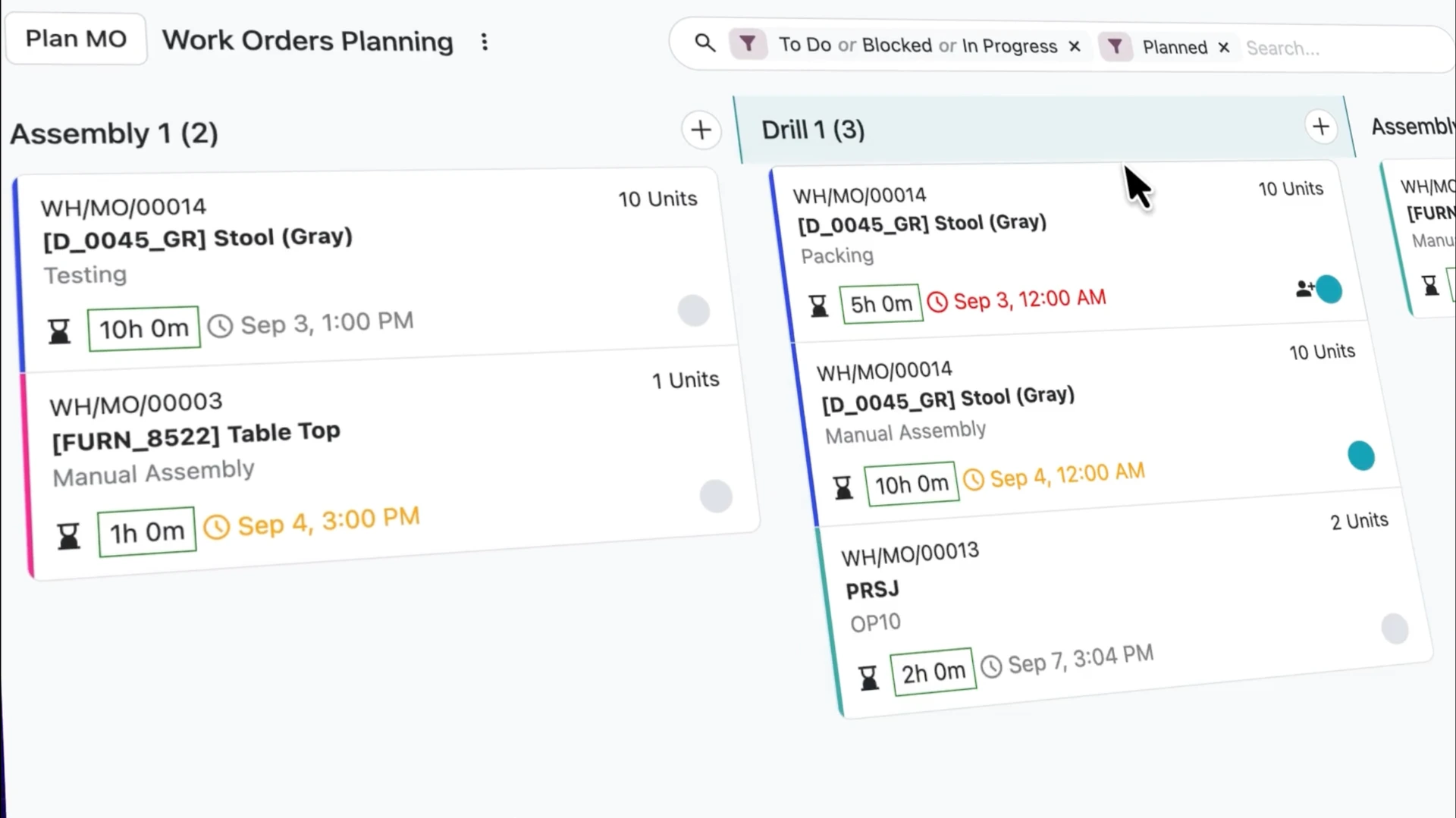
Operators can register quantities directly from work orders, while the next operation can be released automatically, helping production continue without unnecessary pauses.
Odoo 20 also introduces improvements to:
- Bill of Materials comparison.
- Gantt scheduling.
- Manufacturing order rescheduling.
- Kanban-based production planning.
- Priority management.
What this means for manufacturers
Manufacturing environments often depend on precise coordination between people, machines, materials, and production orders.
Odoo 20's updates can help production teams get a clearer view of what needs to happen next and make scheduling adjustments more easily.
For manufacturers, the potential value is not simply a nicer planning interface.
It is the ability to connect planning, production, and inventory information within the same system.
7. AI-Powered Website Creation
Odoo 20 brings AI directly into website creation.
Instead of starting every page from scratch, users can describe the page they want and have Odoo generate it.
Odoo says AI can assist with:
- Creating pages.
- Building promotional content.
- Creating event pages.
- Creating product pages.
- Generating website snippets.
- Rewriting content.
- Translating content.
- Optimising SEO elements.
The AI can also create interactive building blocks where required.
What this means for businesses
Website teams can potentially move from:
Idea → Design → Build → Edit
to a much faster workflow:
Describe → Generate → Review → Refine
This could be particularly useful for businesses that frequently create landing pages, product pages, campaigns, or event content.
But AI-generated content should still be reviewed by people.
Businesses need to make sure the resulting content accurately reflects their brand, products, policies, and customer commitments.
8. eCommerce Gets a More Customer-Focused Checkout
Odoo 20 introduces several improvements to the eCommerce experience.
Customers can now:
- See product variant thumbnails.
- Select preferred delivery dates.
- Request returns directly through their portal.
- Track progress toward free shipping.
- Use a Pay on Invoice option where configured.
Odoo also introduces improvements around pickup-point selection and inventory-based product publishing.
What this means for businesses
Small improvements in the online buying journey can remove friction between product discovery and purchase.
For businesses selling online, giving customers better information about delivery, returns, and shipping incentives can make the checkout process easier to navigate.
For businesses with physical and online operations, stronger integration between eCommerce and inventory can also help keep product availability more aligned with actual stock.
9. Point of Sale Gets a New Experience
Odoo 20 introduces a redesigned Point of Sale experience.
Updates include:
- A redesigned floor-plan editor.
- Improved POS dashboards.
- Automatically built combos.
- The ability to temporarily snooze unavailable products.
- Customer notes from self-ordering appearing on kitchen screens.
- Multiple currencies at one checkout.
- Service fees.
What this means for businesses
These updates are particularly relevant to:
- Restaurants.
- Retailers.
- Hospitality businesses.
- Multi-location businesses.
- Businesses combining physical and online sales.
For restaurants, for example, the ability to update product availability from the POS and have that information reflected in online ordering can help reduce situations where customers order unavailable items.
10. Field Service Moves Into Planning
Odoo 20 brings Field Service directly into Planning.
Teams can schedule interventions using the Planning calendar, while travel time can be calculated automatically.
A map view can also help teams track the live location of field staff.
What this means for service businesses
Consider a company that sends technicians to customer locations.
Previously, scheduling the technician, calculating travel time, managing the work order, and recording the work performed could involve multiple tools.
Odoo's integrated approach brings these activities closer together.
This can be useful for:
- Maintenance companies.
- Installation businesses.
- Engineering services.
- Repair companies.
- Utilities.
- Technical support teams.
11. Odoo 20 Works Offline
One of the practical improvements in Odoo 20 is offline functionality.
Odoo says users can view, create, and edit records without an active internet connection, with changes synchronised when connectivity returns.
Why this matters in real-world operations
Internet connectivity cannot always be guaranteed.
This is particularly relevant for:
- Field workers.
- Remote locations.
- Warehouses.
- Events.
- Retail environments.
- Operations in areas with unreliable connectivity.
For businesses operating in environments where connectivity can be inconsistent, offline functionality can reduce disruption to everyday work.
This could be particularly relevant for organisations operating across different parts of Nigeria and other markets where network reliability varies by location.
12. Communication Becomes More Connected
Odoo 20 also expands communication capabilities.
Discuss brings together:
- Direct messaging.
- Channels.
- Video calls.
- AI.
- Live Chat.
- WhatsApp.
Odoo also introduces features such as:
- Polls.
- Browser-based video calls.
- Call recording.
- Automatic video transcription.
- Screen sharing.
- More flexible call routing.
The Phone application can route calls according to factors such as working hours, location, or team, while phone numbers can be purchased and assigned within Odoo.
What this means for businesses
Communication becomes more closely connected to the business records and workflows employees are already using.
Rather than having customer conversations, internal discussions, and business records scattered across unrelated platforms, organisations can consolidate more of their communication activity within the Odoo ecosystem.
13. Accounting Gets an AI Assistant
Accounting is another area where Odoo 20 introduces significant AI functionality.
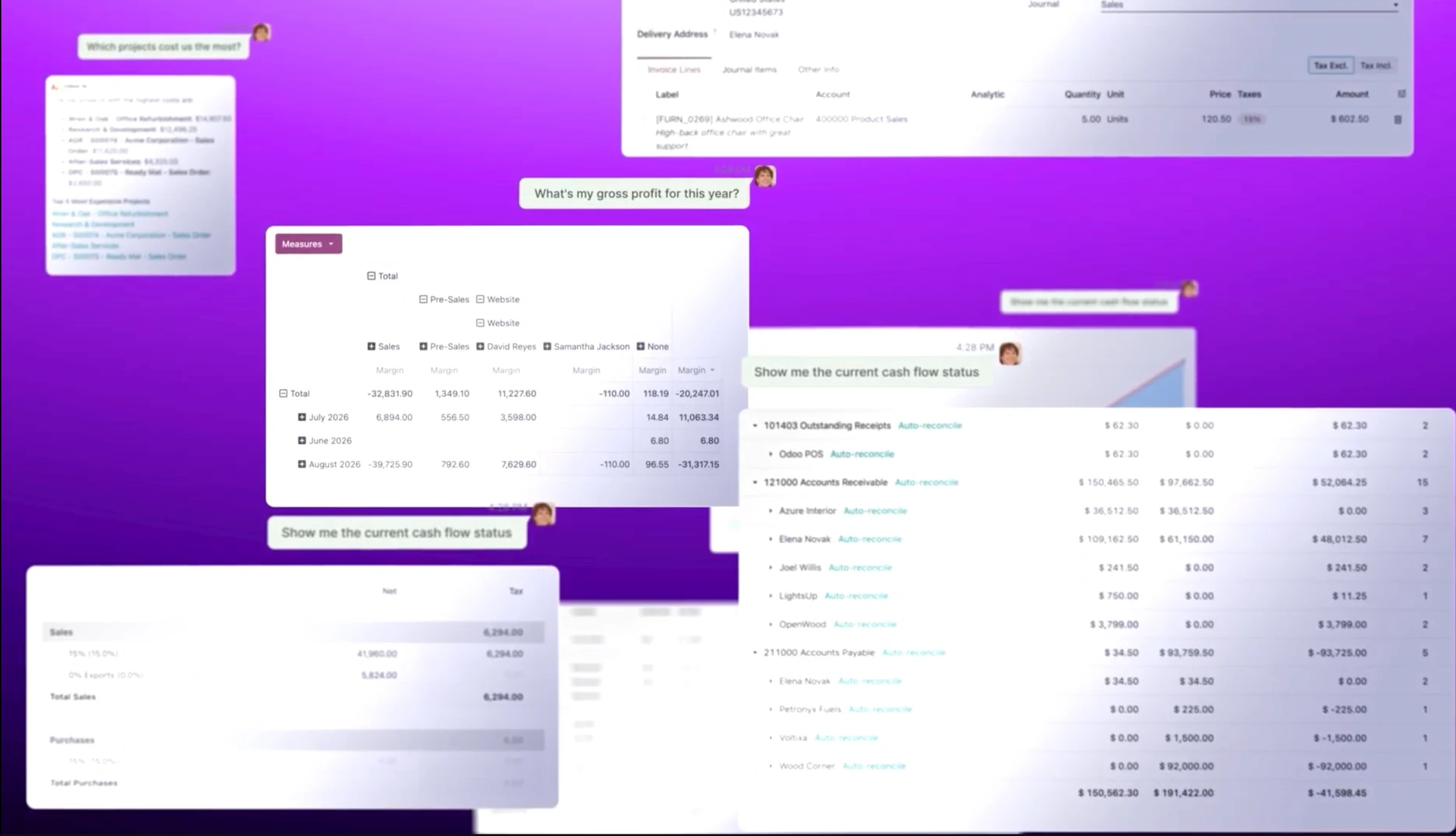
The Accounting AI agent can answer questions about financial information, including receivables and cash flow, using information from Odoo reports.
Odoo also says the AI can analyse reconciliation issues and provide summaries and recommendations.
What this means for finance teams
Instead of manually navigating multiple reports to answer every operational question, finance professionals can use natural-language interactions to investigate financial information.
For example:
“What are our outstanding receivables?”
“What is our current cash position?”
“Are there reconciliation issues I should review?”
The AI does not replace financial oversight.
Rather, it can make financial information easier to access and investigate.
14. Businesses Can Pay Bills Directly From Odoo
Odoo 20 also makes supplier payments more directly connected to the accounting workflow.
Bills can be paid from Odoo:
- Individually.
- In bulk.
- Through supported payment workflows.
- With a sign-now-and-pay-later approach where available.
Odoo highlights this as a way to reduce the need to move between payment files and separate banking processes.
What this means for businesses
For finance teams, reducing the number of systems involved in routine payment processes can make the procure-to-pay workflow easier to manage.
It can also help maintain a closer relationship between:
Purchase → Vendor Bill → Approval → Payment → Accounting Record
That connected flow is particularly useful when organisations are trying to improve financial control.
15. Payroll Gets More Flexible
Odoo 20 introduces several Payroll improvements.
The redesigned payroll dashboard highlights configuration warnings before payroll is processed.
Businesses can also:
- Test a pay run before validating it.
- Print payslips during testing.
- Define working schedules using hours per day.
- Estimate total employment cost from a target net salary.
- Feed employee expenses directly into payroll.
- Simulate employee salary calculations from the employee profile.
Odoo specifically highlights the ability to work backwards from a target net salary to estimate the associated total cost.
What this means for HR and Finance
Payroll decisions often involve more than simply calculating an employee's gross salary.
Businesses need to understand the total cost associated with compensation.
The ability to simulate salary scenarios can therefore support:
- Hiring decisions.
- Compensation planning.
- Budgeting.
- Employee cost analysis.
- Payroll validation.
The testing functionality can also provide an additional opportunity to identify problems before a payroll run is finalised.
16. Odoo 20 Strengthens the Connection Between Departments
The most important Odoo 20 improvement may not be any single feature.
It is the continued development of the platform as an integrated business system.
Consider a typical business transaction:
Customer enquiry
↓
CRM
↓
Sales quotation
↓
Sales order
↓
Inventory
↓
Delivery
↓
Invoice
↓
Payment
↓
Accounting
The value of an integrated ERP comes from the information moving through these processes without employees having to repeatedly recreate the same information in different systems.
Odoo 20 adds more automation and intelligence to these connected workflows.
That is the bigger story behind the release.
What Odoo 20 Means for Businesses Considering an ERP
For businesses that have not yet implemented Odoo, Odoo 20 presents an opportunity to consider ERP differently.
You are not simply choosing accounting software, CRM software, or inventory software.
You are evaluating whether a connected platform can support the way your organisation operates.
For growing businesses
Odoo 20 can provide a foundation for connecting functions that may currently be managed through spreadsheets and separate applications.
The ability to start with relevant applications and expand as requirements grow can be useful for businesses that expect their operations to become more complex.
For manufacturers
The manufacturing, inventory, purchasing, and planning improvements can support businesses managing production processes and material flows.
For retailers
POS, Inventory, eCommerce and CRM can provide a connected view of customer and product activity.
For service businesses
Project, Planning, Field Service, Timesheets and Accounting can help connect customer work with scheduling, execution and billing.
For finance teams
Accounting AI, payment workflows and financial reporting improvements can help finance teams spend less time navigating disconnected information.
For HR teams
Payroll improvements and broader integration with employee information can support more connected employee management.
Should Businesses Upgrade to Odoo 20?
For existing Odoo users, the answer depends on the organisation's current version, customisations, integrations, and business requirements.
A major version upgrade should not be treated as a simple software update.
Businesses should first assess:
1. Your current Odoo version
Understand what version you are running and what has changed between your current version and Odoo 20.
2. Your customisations
Custom modules and modifications may require compatibility checks before an upgrade.
3. Your integrations
Review connections to external systems and confirm how they will work with Odoo 20.
4. Your business processes
Identify which new Odoo 20 features could improve your existing workflows.
5. Your users
New functionality often means new training requirements.
6. Your data
Make sure data is accurate, clean, and properly prepared before undertaking major system changes.
A structured upgrade assessment can help identify potential issues before they affect the business.
What Businesses Should Do Before Implementing Odoo 20?
For organisations considering Odoo 20 as a new ERP, the release is an opportunity to start with the business rather than the technology.
Before implementation, identify:
- Your current business processes.
- Your biggest operational problems.
- Departments that need to be connected.
- Data that needs to be migrated.
- Users who will work with the system.
- External systems that need integration.
- Processes that could benefit from automation.
- Areas where customisation may be required.
- Your implementation budget.
- Your priorities for the first phase.
This matters because Odoo should be configured around your business—not the other way around.
The availability of AI and automation makes this even more important.
Automating a poorly designed process does not necessarily make it a good process.
A proper implementation begins by understanding how the organisation works and determining where Odoo can improve those workflows.
Odoo 20 Is More Than an Upgrade
Odoo 20 introduces a clear shift towards AI-powered, automated and connected business operations.
From AI agents that can execute workflows to smarter inventory replenishment, from AI-assisted website creation to accounting assistance, from offline operations to improved manufacturing and payroll functionality, the release touches many parts of the organisation.
But the value of these features will ultimately depend on how they are implemented.
The question businesses should ask is not simply:
“What features does Odoo 20 have?”
It should be:
“Which Odoo 20 features solve problems we currently have?”
That is where ERP implementation becomes important.
A business may have access to hundreds of applications and features, but it does not need to implement all of them.
The right approach is to identify the processes that matter most, understand the requirements, and configure Odoo around them.
Ready to Explore Odoo 20 for Your Business?
Odoo 20 is now officially available, giving businesses the opportunity to evaluate its latest capabilities based on their actual operational requirements. Odoo's official release notes provide the complete version 20 feature list, while the company's overview highlights the major changes across AI, CRM, purchasing, inventory, manufacturing, website, eCommerce, POS, Field Service, Accounting, and Payroll.
If you are considering Odoo 20 for your organisation, the next step should be understanding what your business needs from the system.
At erpSOFTapp, we help businesses assess their processes, identify opportunities for improvement, and implement Odoo around their actual operational requirements.
Your ERP should fit your business—not force your business to fit the software.
If you're considering an Odoo implementation or an upgrade to Odoo 20, speak with the erpSOFTapp team to discuss your requirements and determine the right approach for your organisation.
Final Takeaway
Odoo 20 brings AI deeper into the ERP, but its real value is still measured by what it does for the business.
The release gives organisations new ways to automate repetitive work, improve decision-making, connect departments and manage operations.
For businesses evaluating Odoo, the opportunity is not simply to adopt the newest version.
It is to use the capabilities of Odoo 20 to build a better way of working.