
Introduction
The month-end and year-end closing processes are critical for any business, ensuring financial accuracy, regulatory compliance, and providing valuable insights for decision-making. A streamlined and efficient closing process is a hallmark of a well-managed finance department. With the release of Odoo 19, a host of new and improved features have been introduced to simplify and enhance these crucial accounting functions.
However, fully leveraging these capabilities often requires proper system configuration and process alignment. Many organisations choose to work with an experienced Odoo consultant or Odoo implementation partner to ensure their accounting workflows are correctly set up and optimised for efficiency.
This article provides an in-depth guide to leveraging Odoo 19's powerful tools for your month-end and year-end closing and audit procedures, complete with explanations of the latest features and how to use them effectively.
Understanding the Closing Process in Odoo 19
Before diving into the specifics, it's important to understand the distinction between month-end and year-end closing. Month-end closing involves wrapping up the accounting activities for a specific month, ensuring all transactions are recorded, reconciled, and accurate before moving to the next period. Year-end closing, on the other hand, is a more comprehensive process that finalises the entire fiscal year's financial records, preparing them for annual reporting and tax filings.
Proper closing procedures are vital for several reasons. They ensure the integrity of financial data, provide a clear picture of the company's financial health, and are essential for both internal and external audits. Odoo 19 is designed to make these processes more efficient, transparent, and collaborative.
Why Proper Odoo Implementation Matters for Financial Closing
An efficient financial close begins with a structured Odoo Implementation. When the chart of accounts, tax settings, fiscal positions, and reporting templates are correctly configured from the start, month-end and year-end processes become significantly faster and more accurate.
Poor implementation often leads to reconciliation errors, missing entries, or inconsistent reporting formats. By investing in a well-planned implementation strategy, businesses reduce manual adjustments and ensure their financial data remains audit-ready throughout the year.
The 8-Step Month-End Closing Process in Odoo 19
Odoo 19 provides a structured, 8-step process for month-end closing, accessible through the Tax Returns dashboard. This process is designed to guide accountants through all the necessary checks and validations, ensuring a thorough and accurate close. Most businesses aim to complete this process within 3-7 days after the month's end.
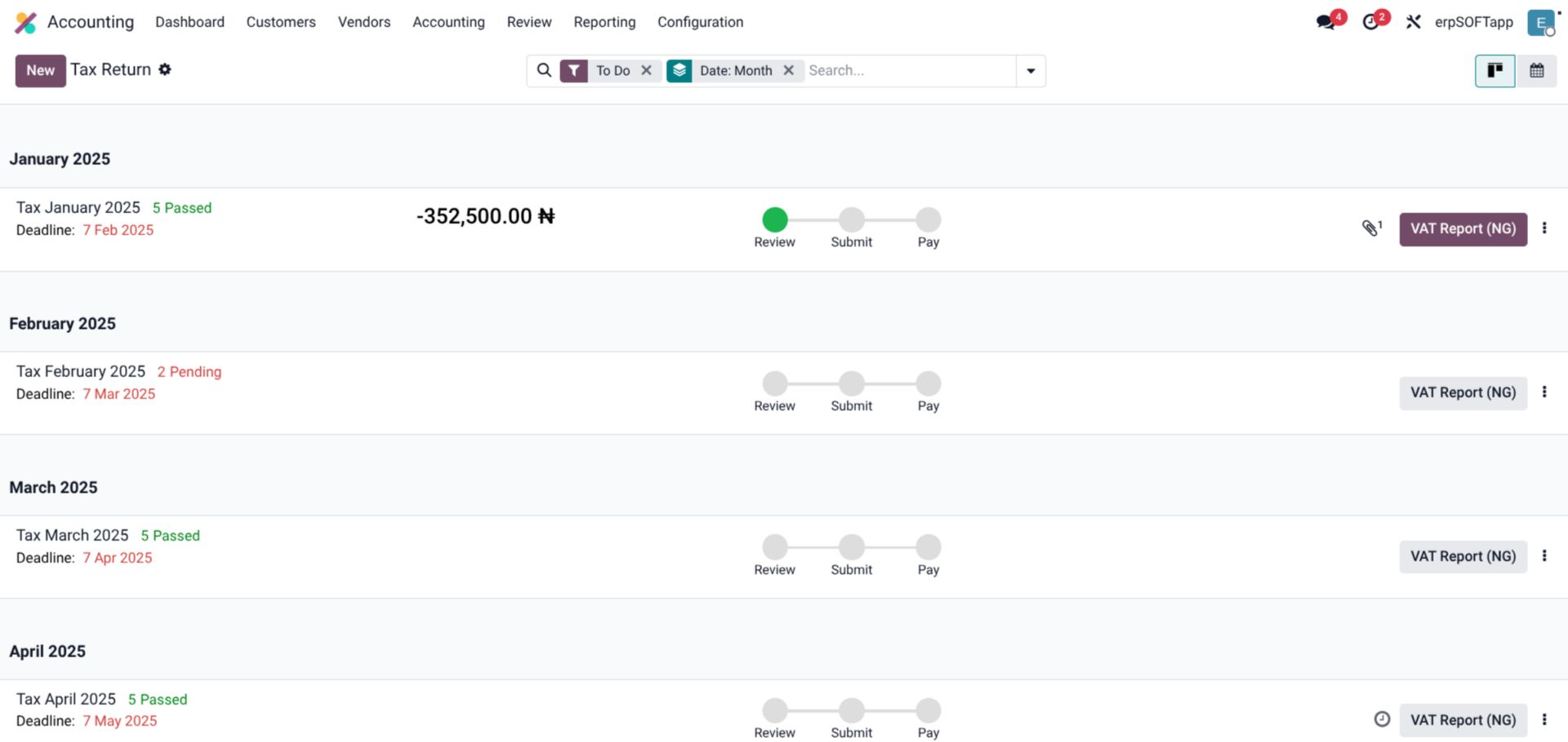
As seen in the image above, the Tax Returns dashboard in Odoo 19 provides a clear, chronological list of all pending returns, including VAT returns and annual closings. Each item displays the period, deadline, and the status of the review, submit, and pay steps, allowing for easy tracking of the closing progress.
Here's a breakdown of the 8-step process:
- Reconcile Bank Transactions: The first step is to ensure all bank accounts are fully reconciled up to the end of the month. Odoo's bank matching feature simplifies this by allowing you to match transactions with invoices, bills, or payments, or to write them off to the correct account.
- Upload Attachments to Vendor Bills: For audit purposes, it's crucial to have supporting documentation for all transactions. Odoo 19 allows you to easily attach PDFs or other files to vendor bills, providing a clear audit trail.
- Verify Company Data: Incorrect company information, such as VAT numbers or country details, can lead to errors in financial reports. This step ensures all company data is accurate and up-to-date.
- Confirm Draft Entries: All draft invoices and bills for the period must be reviewed and either posted or have their accounting date moved to the following month. This step also involves reviewing aging reports for overdue payments.
- Verify Taxes on Invoices and Bills: This check ensures that the taxes applied to invoices and bills are correct based on the customer's country and other relevant regulations.
- Review Financial Statements: A thorough review of the key financial statements is essential. This includes the Balance Sheet, Profit and Loss statement, General Ledger, Aged Receivables, and Aged Payables. Any significant deviations or unusual balances should be investigated.
- Review Tax Report: Before submission, the tax report must be carefully reviewed to ensure all sales and input taxes are correctly recorded.
- Submit Return: Once all checks are completed, the tax return can be submitted. Odoo 19 provides clear payment instructions depending on your fiscal localisation. Submitting the return automatically sets a Tax Return lock date, preventing further modifications to the period's tax entries.
Improved Collaboration and Auditability
Odoo 19 introduces significant improvements in collaboration between accounting and other departments. One of the key features is the ability for non-accountants to create draft bills, which are then flagged for review by an accountant. This ensures that all financial entries are accurate and properly coded before being posted, reducing the risk of errors and improving the overall quality of financial data.
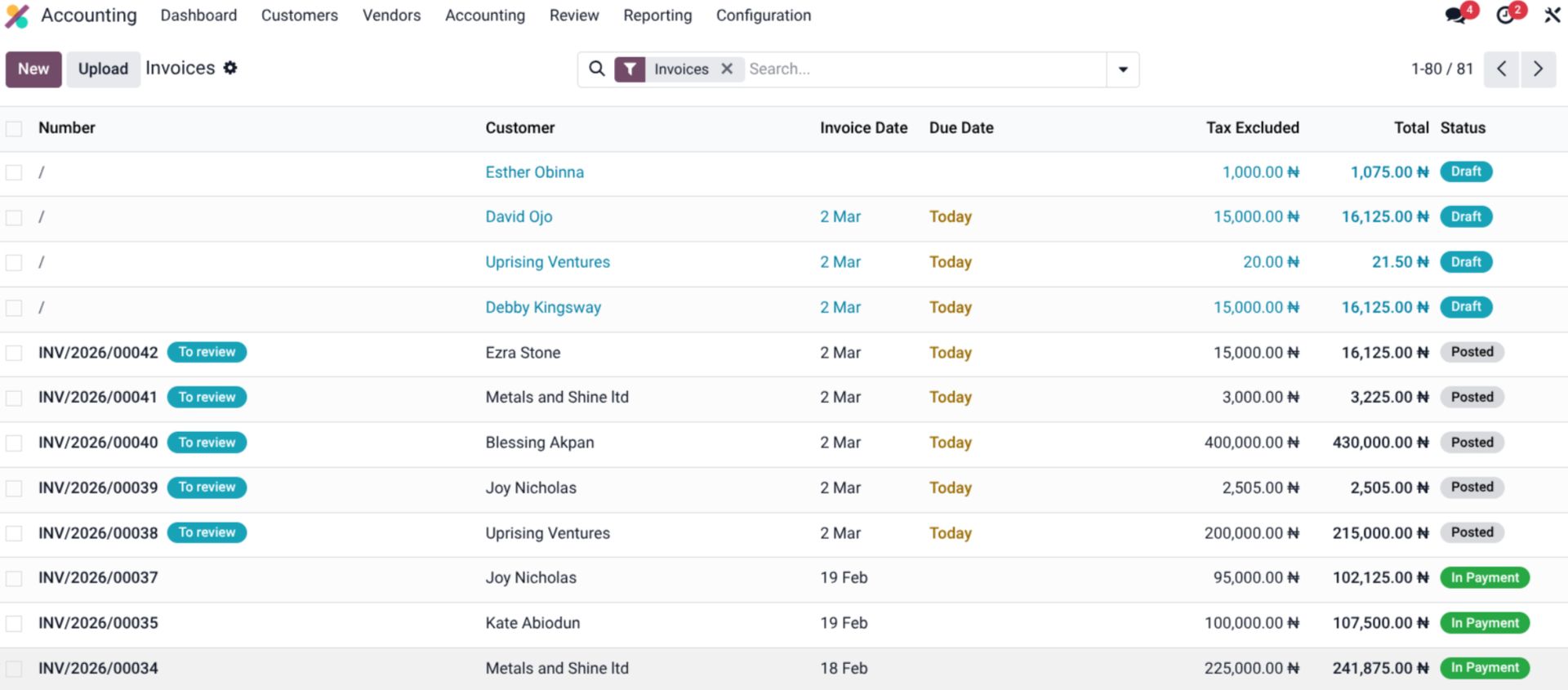
The image above illustrates this collaborative workflow. Bills with the "To review" status are clearly visible in the dashboard, indicating that they require an accountant's attention. This streamlined process bridges the gap between departments and enhances financial control.
To further enhance auditability, Odoo v19 includes a comprehensive account audit trail. This feature provides a detailed history of all changes made to an account, including who made the change, when it was made, and the previous value. This level of transparency is invaluable for both internal and external auditors, providing a clear and complete picture of all financial activity.
The New Audit Checklist Feature
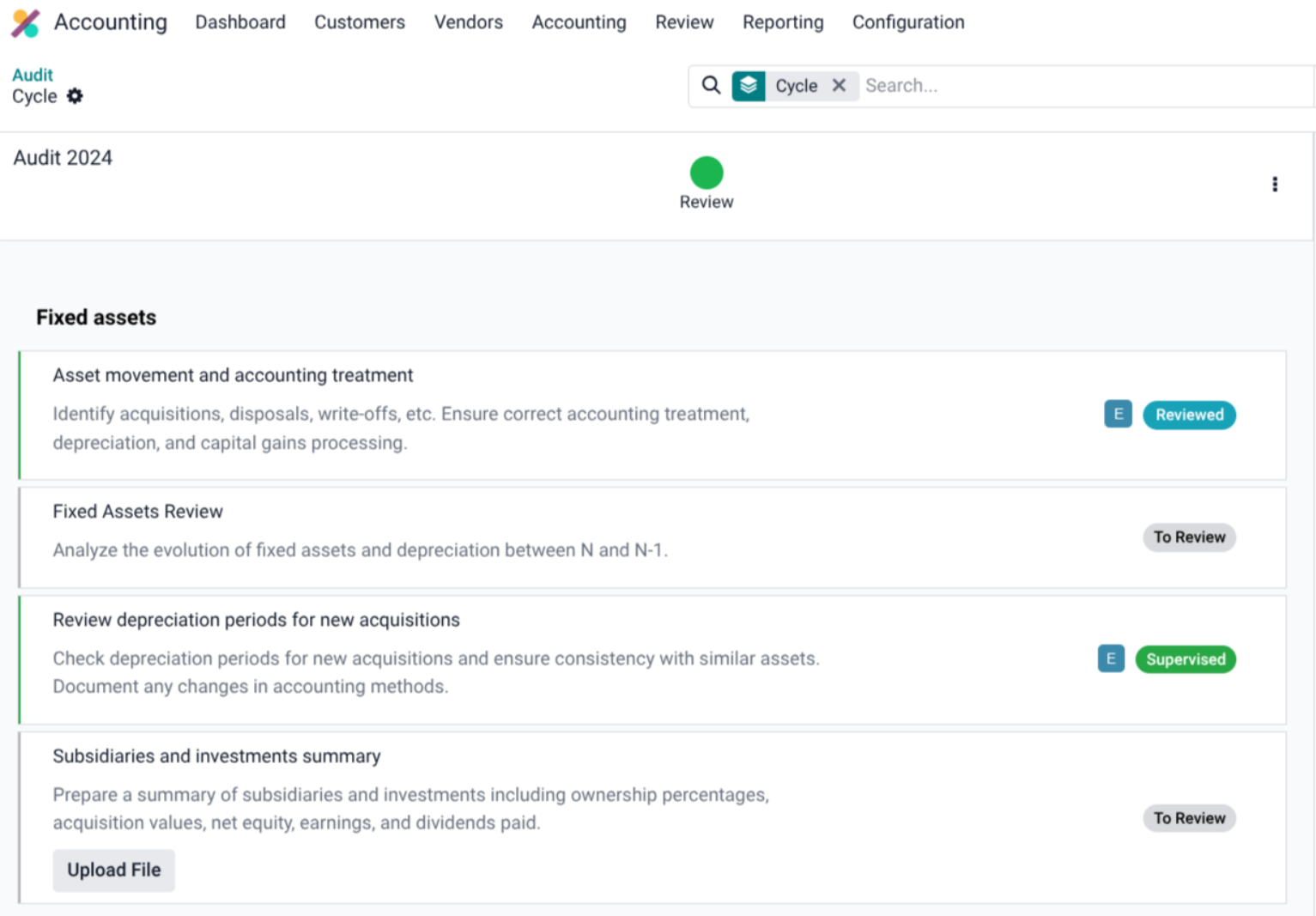
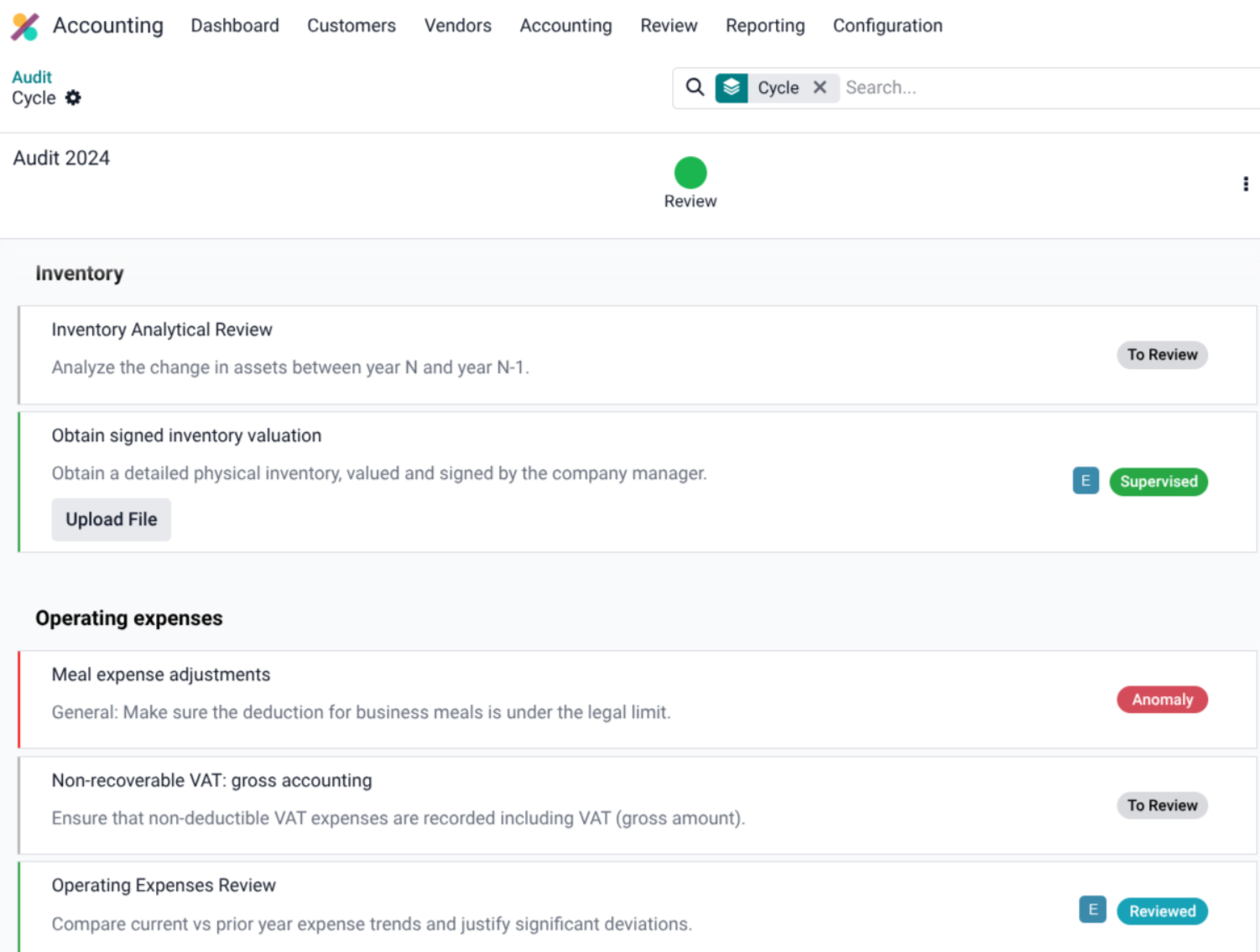
A standout feature in Odoo 19 is the new Audit Checklist, designed to simplify and enhance the auditing process. This powerful tool allows you to use a default audit checklist or create a customised version tailored to your company's specific needs. Each checklist item includes a validation workflow to ensure thorough and consistent checks.
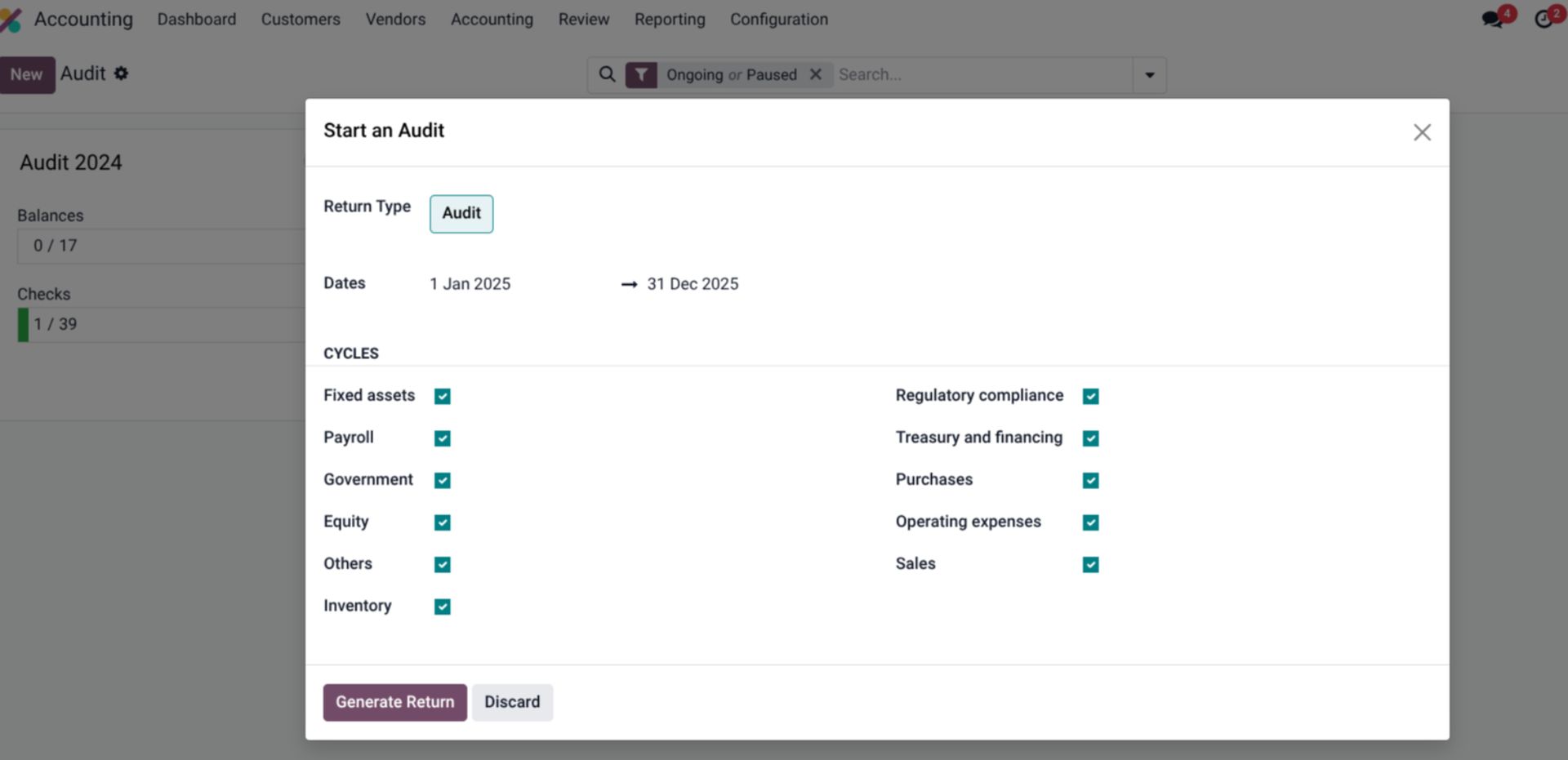
As shown in the image, you can start an audit for a specific period and select the cycles to be included, such as fixed assets, payroll, regulatory compliance, and more. The ability to attach documentation to each checklist item provides a clear audit trail and simplifies the review process. The feature also enables easy auditing of accounts with side-by-side comparisons between periods, helping you identify discrepancies and track changes over time.
Streamlined Stock Valuation
For businesses that manage inventory, stock valuation is a critical part of the period-end closing process. Odoo 19 has refactored the stock valuation process, allowing for the generation of accounting entries in a single click. This significantly reduces the time and effort required to value inventory and ensures that the valuation is accurate and consistent.
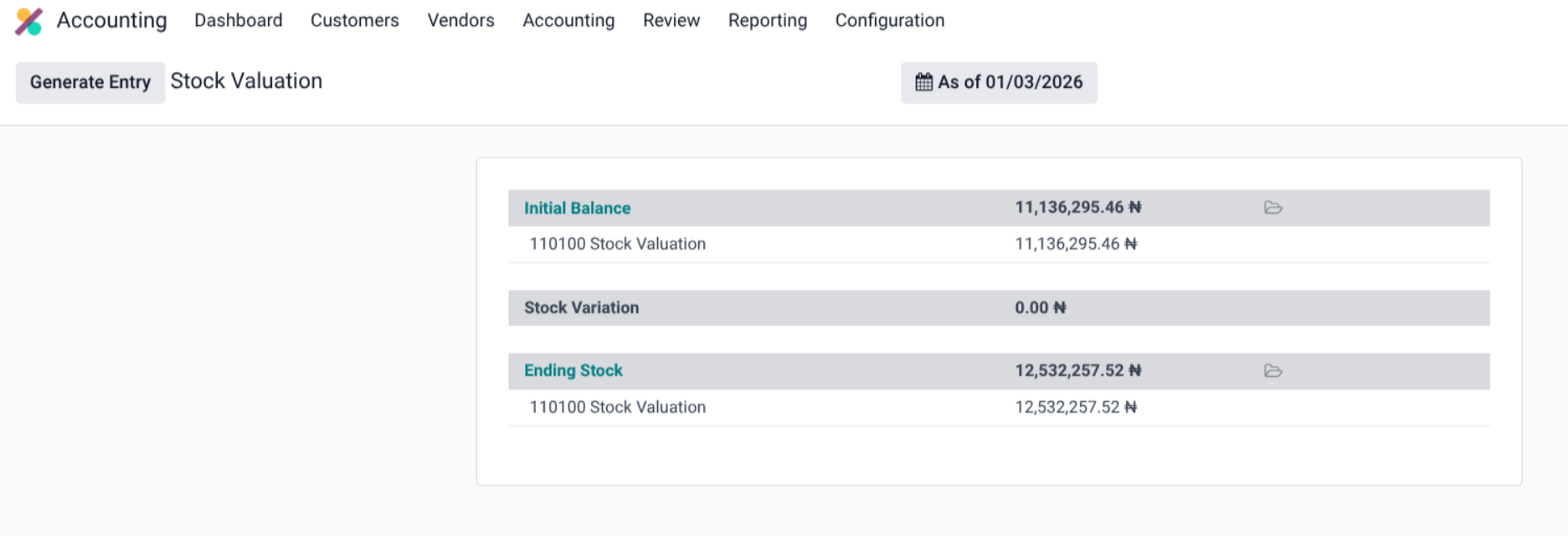
The stock valuation report, as seen in the image above, provides a clear breakdown of the initial balance, stock variation (debits and credits), and the ending stock value. This streamlined process is a major improvement for businesses with inventory.
The Year-End Closing Process
The year-end closing process in Odoo 19 builds upon the month-end procedures, with some additional steps to finalize the fiscal year.
Fiscal Year Configuration and Lock Dates
By default, Odoo's fiscal year is set to 12 months ending on December 31st. However, this can be easily modified in the settings. For non-standard fiscal periods, you can enable the Fiscal Years option and define custom start and end dates.
A crucial part of the year-end process is setting lock dates. The Lock Everything date prevents any modifications to posted journal entries on or before the lock date. For added security and compliance, a Hard Lock date can be set, which is irreversible and ensures data inalterability.
Annual Closing and Earnings Allocation
Odoo uses a special account, 999999 Undistributed Profits/Losses, to represent the current year's earnings. To close the year, you must create a miscellaneous entry to allocate these earnings to an equity account. Once the balance sheet correctly shows a zero balance for the current year's earnings, the annual closing can be finalised.
The Annual Closing process is accessed through the Tax Returns dashboard and involves a two-step process: Review and Submit. This includes a series of validation checks to ensure the accuracy of the year-end figures.
Conclusion
Odoo 19 brings a wealth of powerful new features to the table, transforming the often-dreaded month-end and year-end closing processes into a streamlined, collaborative, and transparent experience. From the structured 8-step month-end close and the innovative Audit Checklist to the improved collaboration tools and comprehensive audit trail, Odoo 19 empowers businesses to achieve greater efficiency, accuracy, and financial control.
By embracing these new features, you can not only simplify your accounting cycle but also gain deeper insights into your financial performance, ultimately driving better business decisions. With the right implementation strategy and expertise, businesses can simplify their accounting cycle, improve financial visibility, and take better strategic steps for long-term growth.